How to Build a Recruiting App: Step-by-Step 2026 Guide
Learn how to build a recruiting app by validating demand, designing core features, and launching a platform recruiters can use to hire faster.
Published
Mar 9, 2026
Written by
Chris P.
Reviewed by
Nithish A.
Read time
7
minutes
The online recruitment software market is projected to reach $4 billion by 2032, growing at an 8.6% CAGR. This growth comes from persistent talent shortages, with 74% of companies struggling to find qualified candidates, and a strong move toward AI-driven platforms that focus on real-time sourcing instead of traditional job boards.
Existing recruitment platforms have some limitations; for instance, enterprise tools cost thousands per seat and rely on profiles that update slowly, while job boards do well with active applicants but rarely reach passive, high-quality talent. As a result, the best opportunity is in recruitment apps that identify availability signals, track career changes, and present accurate matches without requiring recruiters to review hundreds of profiles.
This guide covers how to build a recruiting app from market validation to launch, with emphasis on real-time data integration to enable your users to hire faster and more precisely.
Key Takeaways
Validate demand with real recruiters first
Conduct interviews and prototype tests to uncover actual pain points like outdated profiles and a lack of passive candidate alerts before investing in development.
Build a focused MVP centered on fast sourcing
Prioritize essential features such as advanced search filters and basic pipeline tracking to deliver immediate value while deferring complex additions until user feedback confirms the need.
Integrate real-time data APIs from the start
Use services that provide fresh profiles, enrichment, and change alerts to overcome the limitations of stale databases and enable proactive outreach to passive talent.
Implement semantic AI for accurate matching and ranking
Use natural language processing to go beyond keyword searches, dynamically update scores with live signals, and achieve high relevance in top results, improving recruiter efficiency.
Power your app with Crustdata's real-time capabilities
Crustdata delivers People Search, Enrichment, Watcher alerts, and Jobs tracking to help recruiting apps surface top 1% matches instantly and stay ahead of competitors relying on outdated data.
8 Steps to Build a Recruiting App in 2026
Building a recruiting app requires validating demand, integrating real-time data, and launching fast enough to beat competitors to market. Below is a step-by-step guide on how to go about it:
Step 1: Research the Market and Validate Demand
Start by interviewing 10 to 15 recruiters and asking them to walk through their most recent sourcing process for a difficult role. You will hear the same repeated pain points:
Too much time scrolling through search results with no way to filter for what actually matters
Outdated contact details that bounce or reach the wrong person
No reliable alerts when passive candidates become open to new roles
Then, compare the top platforms to spot their weaknesses. For instance, ZipRecruiter captures active job seekers well but misses specialized passive candidates. Recruitee offers solid pipeline management yet assumes candidates have already been found.
You can use Google Trends, Reddit recruiting threads, and Society for Human Resource Management (SHRM) reports to verify these issues affect a large enough market.
Within Google Trends, you can search terms like "AI recruiting software," "passive candidate sourcing," or "applicant tracking system alternatives" to see whether interest is growing, seasonal, or flattening. Here’s an example for the “ai recruiting software” term:
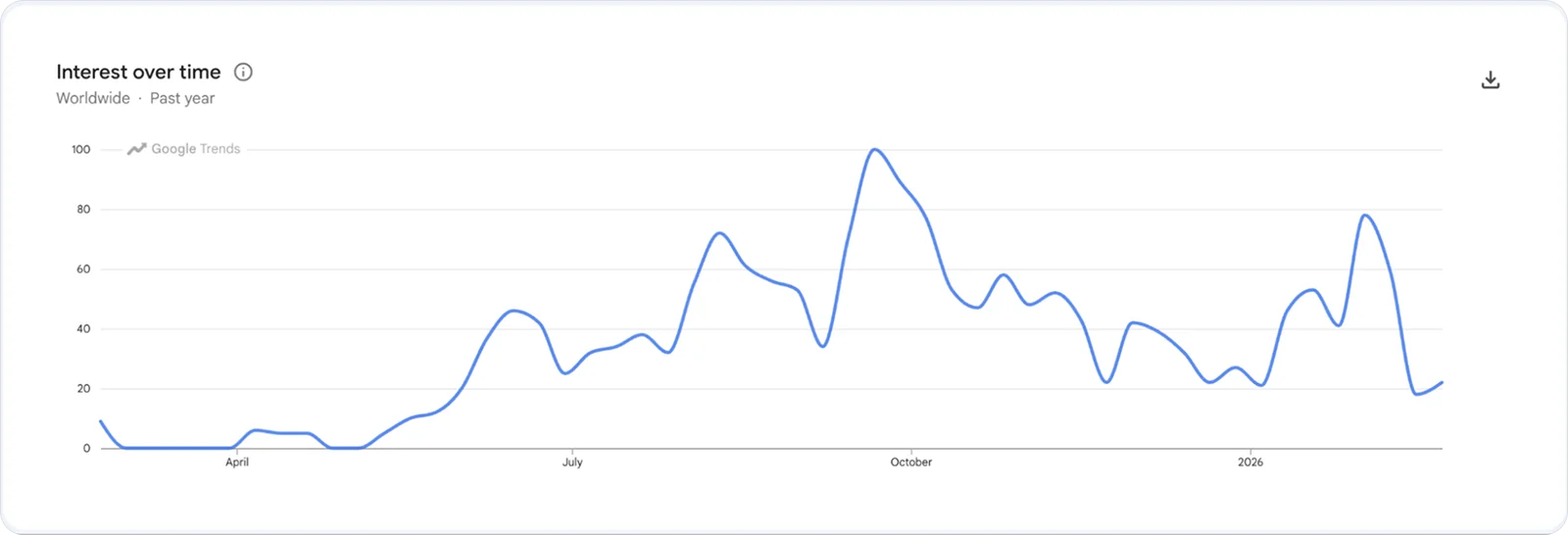
Rising search volume for a specific pain point is a strong early signal that the market is actively seeking a solution.
Also, define your target users clearly. Recruiters at tech companies usually need ATS integrations and team-compatability tools, while agency recruiters managing many roles focus on speed and scale.
After that, run targeted surveys with recruiters using tools like Typeform or Google Forms. Ask them to rank their biggest sourcing frustrations, which filters they rely on most, and how long they typically spend finding a qualified candidate. These responses reveal true priorities better than any planning discussion.
Finally, calculate your return on investment early. For example, if the app reduces sourcing time from 4 hours to 2 hours per role and a recruiter fills 10 positions per month, the savings equal 20 hours at about $100 per hour loaded cost, or $2,000 in monthly value per user. Pricing below this level creates strong adoption potential.
Step 2: Plan Features and Prioritize Your MVP
Once you've validated demand with real recruiters, the next step is deciding what to build first. Focus the minimum viable product on the core sourcing challenge: allow recruiters to go from a vague requirement such as “senior React developer in Austin” to a list of 20 qualified candidates in under 5 minutes. You should avoid building every possible feature at launch.
Why? Because recruiters need to see core value immediately, and a bloated product with half-finished features drives early users away faster than a focused one with a few things that work really well.
Your MVP should focus entirely on the recruiter sourcing workflow:
Advanced candidate search with filters for titles, skills, companies, location, education, and certifications
Real-time profile enrichment pulls fresh data on demand rather than serving stale records
Pipeline dashboard showing stages from sourced to contacted to interviewing to offer
Candidate detail views with work history, skills, verified contact info, and availability signals
Basic analytics tracking time-to-source and conversion rates per search
Export and integration options so recruiters can push candidates into their existing ATS or CRM
Postpone advanced features until real users confirm demand. Here’s an example of how they split:
MVP Essentials (Launch in 3-6 Months) | Post-MVP (After 50+ Active Users) |
Advanced search with filters (title, skills, location, company, experience) | AI scoring with 50+ datapoints |
Real-time profile enrichment via API | Watcher alerts for job changes |
Basic pipeline dashboard | Daily curated talent feeds |
Candidate detail views with contact info and work history | CRM and Slack integrations |
Export to CSV / push to existing ATS | Automated outreach sequences |
Build compliance in from the start. GDPR requires explicit consent and deletion options for EU data. CCPA gives California residents opt-out rights, and the EU AI Act requires transparency in automated decisions. Fixing these later increases costs significantly.
Step 3: Design Your User Interface
Before you write a single line of code, get your interface right. Since you're building a sourcing tool, your only user is the recruiter and for these folks, search UI and accuracy is critical.
For dashboard inspiration, study how search-first tools like Gem, and hireEZ structure their interfaces. The primary action is always finding people, not managing applicants who've already applied. Notice how they prioritize filter panels, inline profile previews, and bulk actions over traditional ATS layouts.
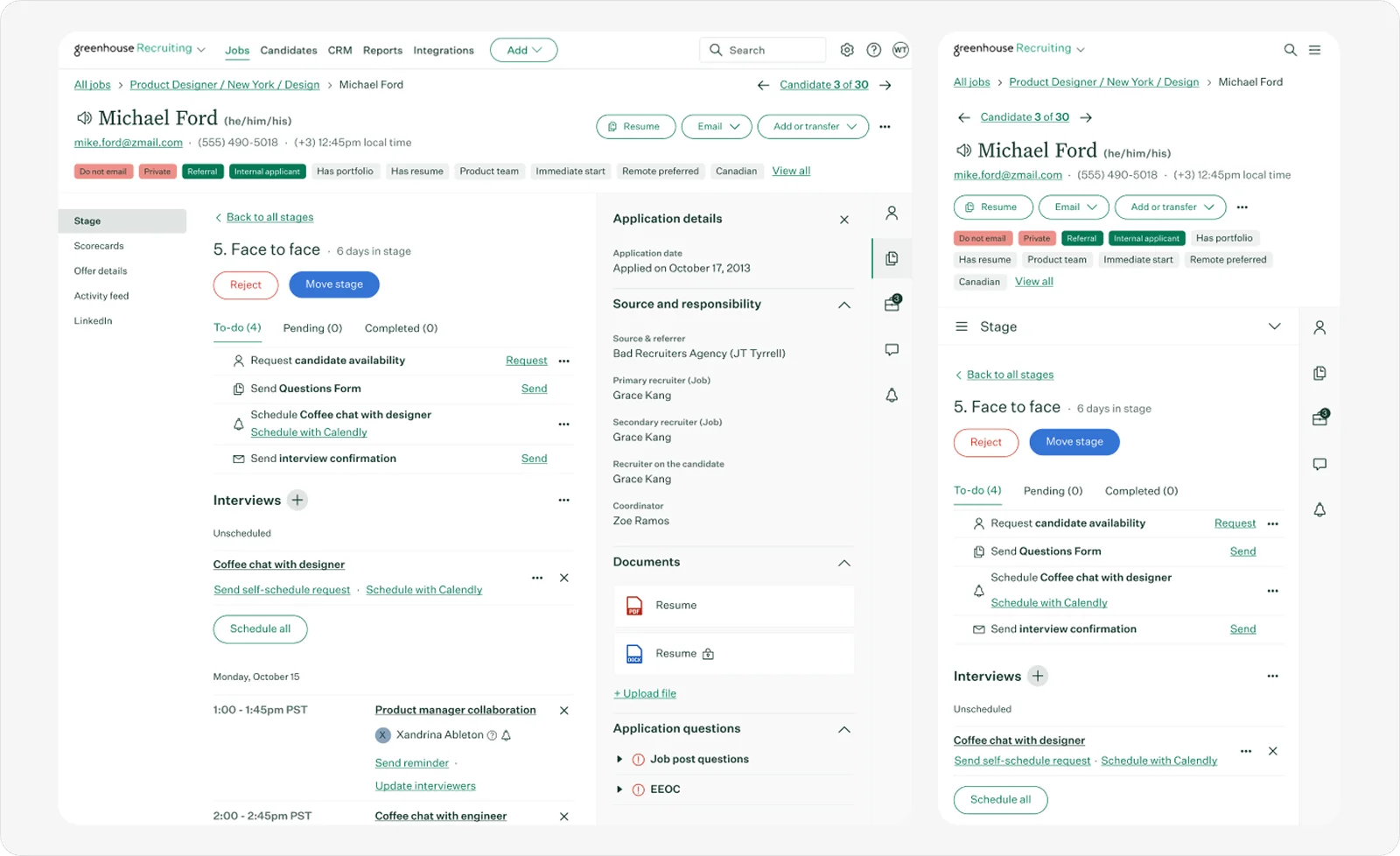
Tip: Search Dribbble and Behance for "people search UI" or "sourcing dashboard" to find relevant design concepts before wireframing your own.
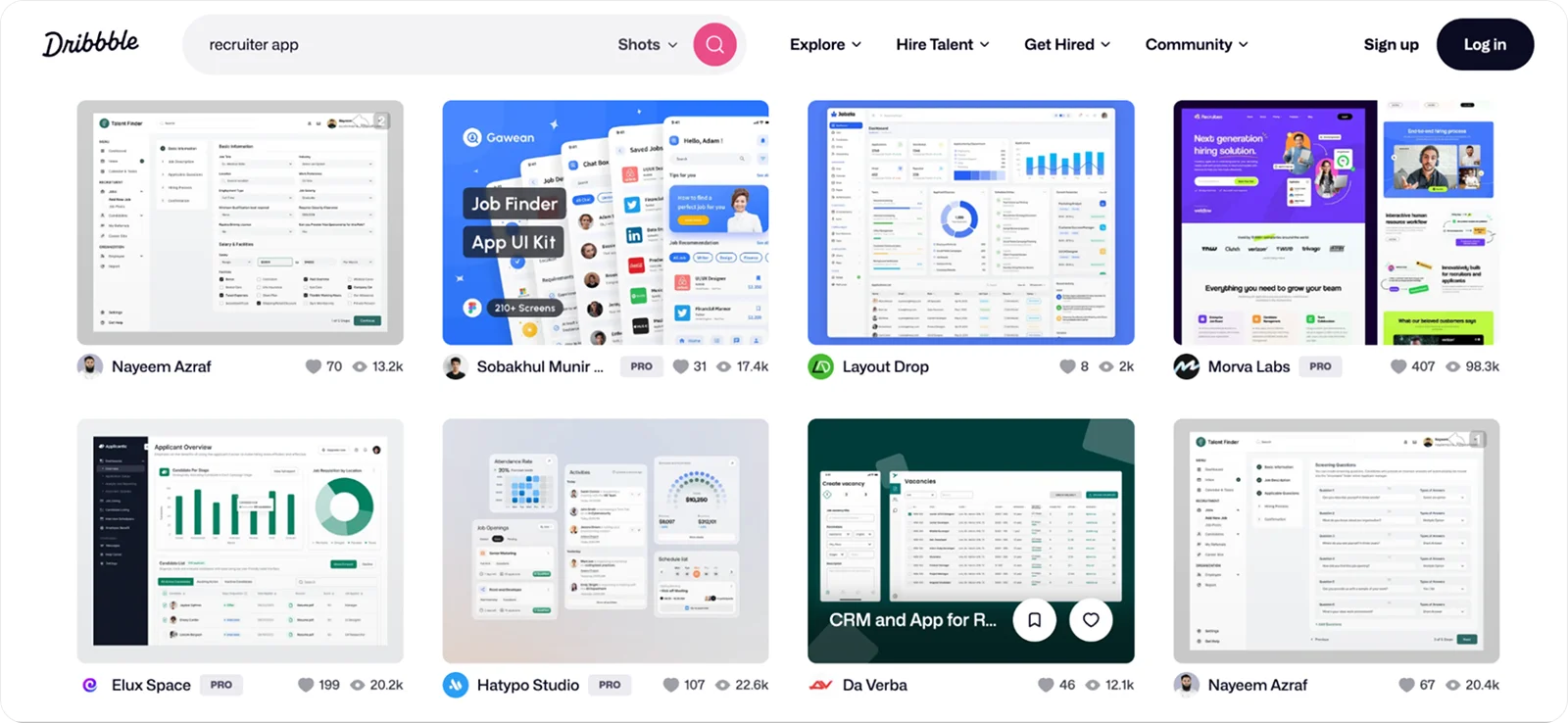
Begin with wireframes of the main flows: job creation, candidate search, pipeline progression, and profile views. Test prototypes with people who do not know the app and simplify anything that takes longer than 30 seconds.
Recruiter dashboard should feature:
Clear, adjustable search filters
Kanban-style pipeline board
Detailed profiles with history, skills, education, and contacts
Analytics summaries on time-to-fill and source effectiveness
Keep actions to no more than 3 clicks where possible and use familiar patterns like swipe matching to improve engagement. Run usability tests with 10 to 15 recruiters, record friction points, and refine designs before coding begins.
Pro tip: You can use Claude to generate an SVG or HTML wireframe from a layout description. Describe the screens you need, the search panel, filter options, candidate cards, pipeline stages and iterate on the output in Figma. It's a fast way to get from idea to testable prototype without a dedicated designer.
Step 4: Build Your Backend and Integrate Data APIs
With your designs validated, you're ready to start building. Start by mapping your data architecture before writing any code:
Database: PostgreSQL for structured records, Redis for caching, and a vector database like Pinecone for AI matching
Backend: Node.js or Python (FastAPI) for your API layer, with REST endpoints for search, posting, and authentication
Enrichment pipeline: Use real-time enrichment for active searches so profiles are fresh at the moment of request. For passive candidates in your database, refresh profiles every 30 days or when a webhook signals a change
Caching: Cache enriched profiles for 24 to 48 hours to reduce API costs, and invalidate the cache immediately when Crustdata's Watcher API detects a change
Security: OAuth 2.0 for authentication, role-based access control, and audit logs for compliance
Optimizing recruitment with real-time data is important because monthly databases miss recent job switches and new certifications. Integrate APIs that pull fresh profiles on demand. For example, with Crustdata, you can enrich candidates automatically with over 90 datapoints using a call like this:
curl 'https://api.crustdata.com/screener/person/enrich?profile_url=https://www.example-profile.com/in/example-user/' \
-H 'Authorization: Token YOUR_API_TOKEN' \
-H 'Accept: application/json'
A response looks like this:
{
"full_name": "Jane Smith",
"current_title": "Senior React Developer",
"current_company": "Acme Corp",
"location": "Austin, TX",
"email": "jane.smith@acmecorp.com",
"years_of_experience": 7,
"skills": ["React", "TypeScript", "Node.js"],
"last_job_change": "2024-08-01",
"open_to_work": false,
"past_companies": ["Stripe", "Shopify"]
}
For a sourcing tool, the fields that matter most are current_title, skills, last_job_change, and open_to_work. These four drive your matching logic, availability scoring, and outreach timing. The remaining datapoints, like past companies, education, and certifications, feed your ranking weights and personalization layer.
Cache enriched profiles for 24 to 48 hours to reduce API costs and invalidate them immediately when a change is detected. For security, implement OAuth 2.0 for authentication, encrypt data at rest and in transit using AES-256 and TLS 1.2+, and maintain audit logs recording every data access and enrichment call to satisfy GDPR and CCPA requirements. If you want a deeper treatment of securing candidate data, OWASP's API Security Top 10 is a practical starting point.
Step 5: Implement AI for Matching and Ranking
Once your backend is in place, matching the right candidates to the right roles becomes your next challenge. Keyword matching alone does not work well because resumes and job descriptions rarely match exactly. Natural language processing handles this better by understanding meaning rather than exact words. Here's how to build it out:
Use a pre-trained embedding model like OpenAI's text-embedding-ada-002 or an open-source alternative like Sentence-BERT to convert job descriptions and candidate profiles into vector representations
Store those vectors in a vector database like Pinecone, Weaviate, or pgvector
At query time, embed the job description and run a similarity search to retrieve the closest candidate matches
Layer your ranking logic on top of the similarity scores to factor in recency, availability signals, and recruiter-defined weights
Then, develop ranking logic that weighs skill alignment, experience, education, recent activity, and availability signals. Rather than hardcoding fixed weights, let recruiters adjust them based on what matters most for each role. A recruiter prioritizing speed-to-hire will weigh availability signals differently than one focused on a very specific technical skill set. Giving users control over these parameters produces more relevant results and makes your platform more adaptable across different hiring contexts.
Update scores in real time as new information arrives, such as promotions or profile edits. Make sure to expand matching to include related titles so “machine learning engineer” finds “ML specialist” variations.
Highlight candidates with strong availability signals such as recent updates, long tenures, or #OpenToWork badges, and send automated daily match feeds to inboxes or CRMs.
Note: Use advanced people search APIs for complex queries that feed your search engine. Example:
Bash
curl 'https://api.crustdata.com/screener/person/search/' \
-H 'Authorization: Token YOUR_API_TOKEN' \
-H 'Content-Type: application/json' \
--data '{
"filters": [
{"filter_type": "CURRENT_TITLE", "type": "in", "value": ["Senior React Developer", "Lead Frontend Engineer"]},
{"filter_type": "LOCATION", "type": "in", "value": ["Austin, TX", "San Francisco, CA"]},
{"filter_type": "RECENT_JOB_CHANGE", "type": "=", "value": true}
],
"page": 1
}'
Then, validate by having recruiters mark each result as 'would contact' or 'would skip.' Track that ratio over time as your baseline quality metric for assessing how well your matching engine is performing.
Step 6: Test Before Launch
Before you launch, you need confidence that your platform holds up under real conditions. Break testing into phases covering functionality, performance, security, and real-world usage:
Start with functional testing that includes unit tests for functions like search, scoring, and parsing, integration tests verifying APIs work together, and end-to-end tests simulating complete flows. Write tests as you build, not afterward.
Run performance testing by simulating the user load you realistically expect in your first six months. Search should respond under 500ms while pipeline boards should load under one second.
Conduct security testing that covers:
Penetration testing for authentication vulnerabilities
SQL injection and XSS prevention
Role-based access verification
Audit log accuracy
Track which features they use, where they get stuck, and what feels clunky. Also, fix critical bugs immediately. Data accuracy problems destroy trust, while minor UI issues can wait.
Step 7: Deploy and Launch Your App
Deploy your platform to a cloud provider like AWS, Google Cloud, or Microsoft Azure. Set up your custom domain, configure SSL certificates, and run a final environment check to confirm everything works exactly as it does locally. This is also the time to set up staging and production environments separately so future updates don't go live untested.
Set up CI/CD pipelines for ongoing updates. Use GitHub Actions, GitLab CI, or similar tools to automatically test and deploy code when you push changes. This prevents broken releases and lets you ship bug fixes within hours instead of days.
Start with a closed beta before opening to the public. Reach out to 20 to 30 recruiters through your existing network, cold outreach, or active Slack communities where recruiters spend time. Communities like OneReq, #People, and People Geek are good starting points. Give free access for 60 days in exchange for weekly feedback sessions, then fix critical issues before opening to broader users.
Once your closed beta is stable, you can launch across multiple channels simultaneously, or start with one and then expand. Here are some useful ideas:
Prepare your search engine optimization campaign
Launch on Product Hunt
Publish to beta testing platforms like BetaList and BetaTesting.com
Write comparison pages against established platforms
Partner with recruiting communities and offer affiliate commissions
Consider these monetization approaches as starting points to test and adapt, not a fixed formula:
Freemium: Free tier with 25 candidate searches monthly, with paid plans for unlimited searches
Pay-per-seat: Charge per month per recruiter, depending on features
Usage-based: Charge per candidate search or enrichment for teams with variable hiring needs
Enterprise: Custom pricing for agencies with 10+ recruiters
Monitor post-launch with analytics tracking user behavior, feature usage, and conversion funnels. Set up error tracking to catch bugs users encounter in production. Watch for patterns in how recruiters actually use features versus how you designed them.
Pro tip: Install Microsoft Clarity to record real user sessions and generate heatmaps showing exactly where recruiters click, scroll, and drop off.
Step 8: Maintain and Iterate
Launching is only the beginning. Track metrics that indicate whether your app actually helps recruiters work faster:
Time spent per candidate search
Number of candidates reviewed before finding qualified matches
Time from first outreach to candidate reply
User retention week-over-week
Feature usage showing which capabilities matter most
Collect feedback through in-app surveys, user interviews, and support tickets. When more users request the same feature, prioritize it. When nobody uses a feature you spent weeks building, consider removing it to simplify your interface.
Update your app weekly with new features based on usage data. Release patch updates immediately for bugs affecting data accuracy or core workflows.
Pro tip: Incentivize feedback by offering users free credits or additional candidate searches in exchange for completing a short usage survey. Recruiters are busy, and a small reward significantly increases response rates, giving you better data to prioritize your next update.
Common Mistakes to Avoid When Building a Recruitment App
Even with solid planning, recruiting app projects can stumble on avoidable issues. Here are the most frequent pitfalls developers and founders encounter:
Overbuilding the MVP: Adding advanced features like video interviews or complex analytics before validating basic sourcing leads to wasted time and scope creep. Stick to core discovery until 50+ users confirm needs.
Relying on stale or monthly-updated data: Traditional databases let candidates change jobs before their profiles refresh, leading to missed opportunities. Always prioritize real-time APIs from day one to maintain freshness.
Neglecting compliance and bias mitigation: Skipping GDPR/CCPA setup or AI transparency (EU AI Act) creates retrofits that cost more. Build consent, deletion, audit logs, and bias checks into the foundation.
Skipping thorough beta feedback: Launching without real recruiter testing results in low adoption. Run closed betas with active users, fix data accuracy first, and iterate based on actual usage patterns.
Poor integration planning: You don't need to build CRM or Slack integrations for your MVP, but you do need to design your backend so they're easy to add later. That means clean API endpoints, standardized data formats, and webhook support baked into your architecture from day one. If you build in a silo and bolt on integrations later, you'll end up refactoring your data model when you should be shipping features.
Over-reliance on automation without human oversight: AI excels at matching but can miss nuance like team compatibility or soft skills. Balance scoring with recruiter review loops to avoid rejecting strong candidates.
Not accounting for API costs in your pricing model: Offering unlimited candidate searches on a flat monthly fee while paying per API call to your data provider destroys margins at scale. Before pricing your plans, map exactly which user actions trigger API calls, estimate average usage per recruiter, and build in a buffer.
Addressing these early keeps development efficient and positions your app for long-term success.
How Crustdata Powers Modern Recruiting Apps
If you're building a recruiting platform that competes on speed and data quality, your data infrastructure is what separates you from the tools recruiters already have. Most recruiting platforms rely on databases that update monthly or quarterly. By the time you see a candidate profile, they may have changed jobs, earned new certifications, or accepted another offer. Real-time data APIs solve this by pulling current information when you search, not serving stale snapshots.
Crustdata provides the data infrastructure recruiting apps need to compete:
People Discovery API: You don't need to build your own candidate database from scratch. Search 1 billion+ profiles with 60+ filters, including skills, job titles, companies, education, certifications, location, and experience levels using our API.
People Enrichment API: Pull 90+ datapoints per candidate, including complete work history, education timeline, skills, certifications, social profiles, and verified contact information.
Watcher API: Receive webhook notifications when tracked candidates change jobs, update profiles, earn certifications, or get promoted.
Crustdata also lets you connect via REST APIs with comprehensive documentation and code examples. Receive real-time updates through webhooks, delivering candidate changes to your database, CRM, or Slack, and access bulk datasets via CSV or Parquet files for initial database population. Get technical support for implementation and optimization with dedicated Slack channels. Traditional data providers update databases monthly, missing candidates who became available last week. Crustdata crawls data in real-time at the moment of request, surfacing current profiles with fresh availability signals. This means finding passive candidates before competitors reach them, not after they’ve already interviewed elsewhere.
Unlike static enrichment services returning cached data, Crustdata combines data from 15+ verified sources into unified records with a consistent schema. You get complete candidate profiles without stitching together multiple vendor APIs or handling conflicting information.
Are you ready to build a recruiting app that reaches talent before the competition?
Book a demo or take a look at our public docs to see these real-time features in action.


Products
Popular Use Cases
Competitor Comparisons
95 Third Street, 2nd Floor, San Francisco,
California 94103, United States of America
© 2026 Crustdata Inc.
Products
Popular Use Cases
Competitor Comparisons
95 Third Street, 2nd Floor, San Francisco,
California 94103, United States of America
© 2025 CrustData Inc.
Products
Popular Use Cases
95 Third Street, 2nd Floor, San Francisco,
California 94103, United States of America
© 2025 CrustData Inc.